

Payment Methods Management
Payment methods are the backbone of your swapping platform, providing users with diverse options for sending and receiving funds. This guide covers everything you need to know about setting up, configuring, and managing payment methods effectively.
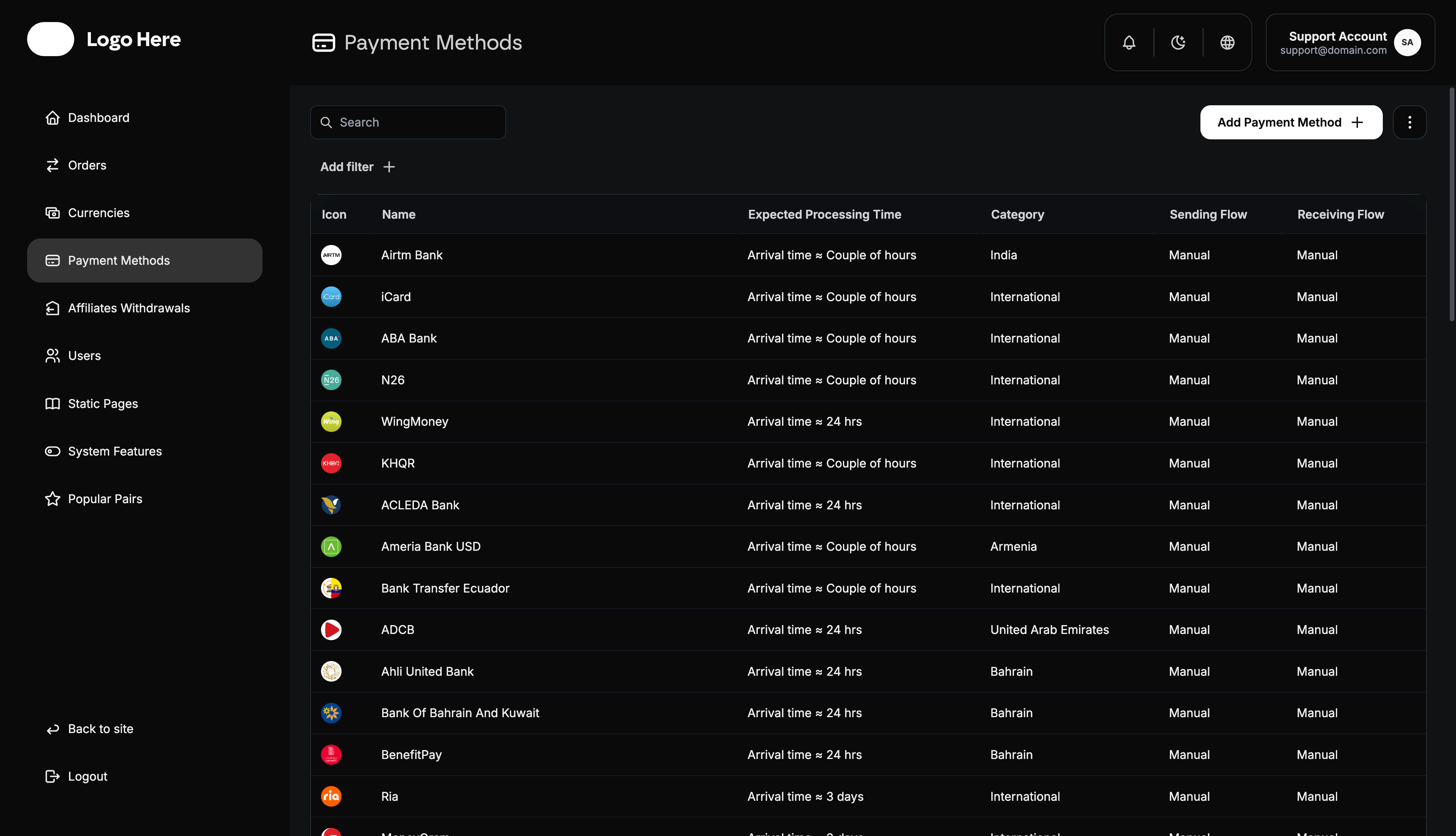
Payment Methods Overview
The payment methods system allows you to:
- Add and configure multiple payment options
- Set fees and processing limits
- Connect payment methods to specific currencies
- Customize user experience for each method
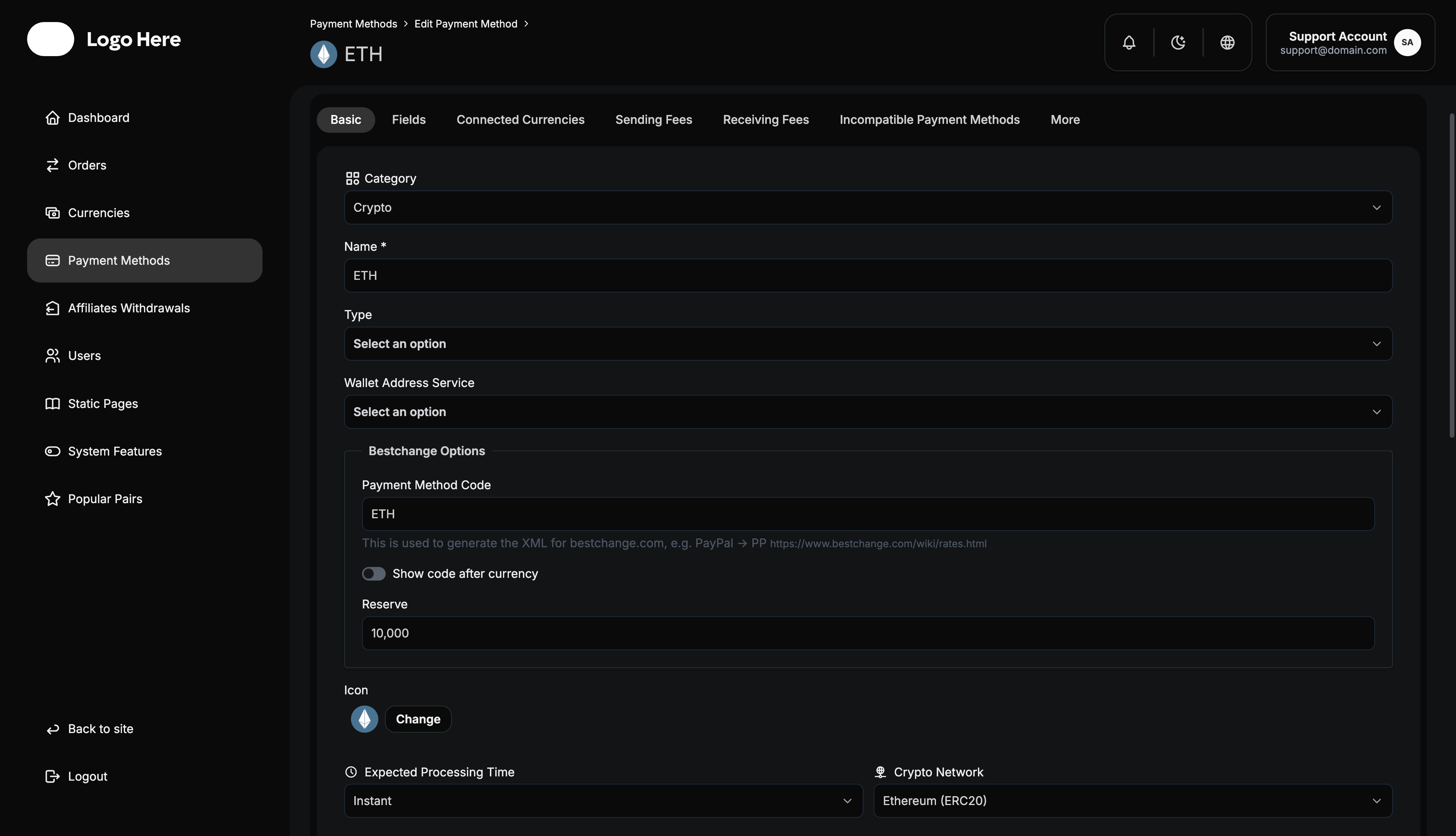
Payment Method Display Structure
Each payment method is organized with the following information:
- Icon - Visual identifier for easy recognition
- Name - Clear, descriptive payment method title
- Expected Processing Time - User expectation management
- Category - Classification of the payment method
- Highlighte - A boolean or flag indicating if this method is featured
- Note - Important instructions, limitations, or additional information for the user
- Sending Flow - Manual or automated processing indicator
- Receiving Flow - Manual or automated processing indicator
Adding New Payment Methods
Required Information
When adding a new payment method, you must provide:
- Name - Clear, recognizable payment method title
- Icon/Logo - Visual representation for user interface
- Category - Geographic region or country where available
- Expected Processing Time - Realistic completion timeframe
- Crypto Network - For cryptocurrency methods, specify blockchain
- Sending Capability - Whether users can send funds using this method
- Sending Flow Type - Manual or automated processing
- Receiving Information - Details users need for transactions
- Receiving Capability - Whether users can receive funds using this method
Payment Method Types
Traditional Payment Methods
- Bank Transfers - Direct account-to-account transfers
- Credit/Debit Cards - Card-based payments
- E-Wallets - Digital wallet services (PayPal, Skrill, etc.)
- Online Banking - Internet banking systems
- Mobile Money - Mobile payment solutions
- Cash Pickup - Physical cash collection points
Cryptocurrency Payment Methods
- Bitcoin (BTC) - Primary cryptocurrency
- Ethereum (ETH) - Smart contract platform currency
- Stablecoins - USDT, USDC, BUSD, etc.
- Altcoins - Alternative cryptocurrencies
- DeFi Tokens - Decentralized finance tokens
Geographic Considerations
When adding payment methods, consider:
- Local Preferences - Popular methods in target regions
- Regulatory Compliance - Legal requirements by country
- Currency Support - Local fiat currency compatibility
- Processing Networks - Available infrastructure
- User Familiarity - Methods users are comfortable with
Payment Method Configuration
Each payment method requires detailed configuration through siven main tabs:
1. Basic Settings
Essential Information
- Name - Payment method display title
- Icon - Upload method logo or icon file
- Category - Select applicable country/region
- Expected Processing Time - Set realistic timeframes (minutes, hours, days)
- Crypto Network - For crypto methods, select blockchain network
Multi-language Support
- Extra Information Fields - Additional details displayed to users
Capabilities Configuration
- Send Capability Checkbox - Enable if users can send with this method
- Sending Flow Selection - Choose Manual or Automated processing
- Receiving Instructions - Information users need for sending funds
- Receive Capability Checkbox - Enable if users can receive with this method
- Receiving Flow Selection - Choose Manual or Automated processing
2. Fields Configuration
Define what information users must provide when using this payment method.
Sending Fields
Configure required user inputs for sending money:
- Field Name - Arabic, English and other labels
- Field Type - Text, number, email, phone, etc.
- Required/Optional - Mark fields as mandatory or optional
- Validation Rules - Format requirements and restrictions
- Help Text - User guidance for completing fields
Receiving Fields
Configure required user inputs for receiving money:
- Field Name - Arabic, English and other labels
- Field Type - Text, number, email, phone, etc.
- Required/Optional - Mark fields as mandatory or optional
- Validation Rules - Format requirements and restrictions
- Help Text - User guidance for completing fields
Common Field Examples
For Bank Transfers:
- Account Number (Required)
- Account Holder Name (Required)
- Bank Name (Required)
- SWIFT/IBAN Code (Optional)
- Branch Address (Optional)
For E-Wallets:
- Wallet Email/ID (Required)
- Account Name (Required)
- Phone Number (Optional)
For Cryptocurrencies:
- Wallet Address (Required)
- Network Selection (Required)
- Memo/Tag (Optional)
3. Connected Currencies
Link payment methods to specific currencies for optimal user experience.
Currency Linking Process
- View Connected Currencies - See currently linked currencies
- Link New Currency - Select from available currencies
- Set Default Currency - Choose primary currency for this method
- Manage Connections - Add or remove currency links
Connection Benefits
- Simplified User Interface - Show relevant payment methods only
- Better Conversion Rates - Optimize exchanges between connected pairs
- Reduced Errors - Prevent incompatible currency/method combinations
- Improved Performance - Faster loading with relevant options only
Default Currency Setting
- Primary Association - Set main currency for this payment method
- Exclusive Mode - Limit method to default currency only
- Flexible Mode - Allow multiple currencies with preferred default
4. Sending Fields (Fees & Limits)
Configure fees and limits for users sending money with this method.
Amount Limits
- Minimum Amount (MIN) - Lowest allowed sending amount
- Maximum Amount (MAX) - Highest allowed sending amount
Fee Structure
- Fixed Fee - Flat rate charged regardless of amount
- Percentage Fee - Rate applied to transaction amount
- Combined Fees - Both fixed and percentage fees
- Zero Fee Option - No charges for this method
- Tiered Fees - Different rates for different amount ranges
Fee Examples
Fixed Fee: $5 per transaction
Percentage Fee: 2.5% of transaction amount
Combined: $2 + 1.5% of amount
Tiered: 0-$100 (1%), $101-$500 (0.8%), $500+ (0.5%)
Fee Calculation Display
- Transparent Pricing - Show all fees clearly to users
- Real-time Calculation - Update fees as users enter amounts
- Fee Breakdown - Separate display of different fee components
- Total Cost - Combined fee summary
5. Receiving Fields (Fees & Limits)
Configure fees and limits for users receiving money with this method.
Amount Limits
- Minimum Amount (MIN) - Lowest allowed receiving amount
- Maximum Amount (MAX) - Highest allowed receiving amount
Fee Structure
Configure receiving fees using the same options as sending:
- Fixed Fee - Flat rate for receiving funds
- Percentage Fee - Rate applied to received amount
- Combined Fees - Both fixed and percentage fees
- Zero Fee Option - No charges for receiving
- Tiered Fees - Amount-based fee scales
Important Considerations
- User Experience - Balance competitive fees with profitability
- Market Standards - Research competitor pricing
- Processing Costs - Factor in your operational expenses
- Volume Incentives - Consider lower fees for high-volume users
6. Incompatible Payment Methods
Define which payment methods cannot be used together in a single transaction.
Incompatibility Management Process
- View Incompatible Methods - See currently configured incompatible payment methods
- Add Incompatibility - Select payment methods that shouldn’t work together
- Remove Incompatibility - Clear incompatibility restrictions when no longer needed
- Manage Restrictions - Update incompatibility rules as requirements change
Incompatibility Benefits
- Prevent Invalid Combinations - Block payment method pairs that can’t work together
- Improved User Experience - Hide unavailable options automatically
- Reduced Errors - Prevent users from selecting incompatible method pairs
- Operational Efficiency - Avoid processing transactions that will fail
Common Incompatibility Scenarios
Technical Limitations:
- Cryptocurrency methods incompatible with certain fiat methods
- Different blockchain networks that can’t interoperate
- Payment processors with conflicting requirements
Regulatory Restrictions:
- Cross-border restrictions between certain countries
- Compliance requirements preventing specific combinations
- Sanctions or legal limitations
Business Rules:
- High-risk method combinations
- Fee structure conflicts
- Processing time incompatibilities
How It Works
When a user selects a payment method for sending:
- The system automatically filters out incompatible receiving methods
- Only compatible payment methods are displayed as options
- Users cannot create orders with blocked method combinations
When a user selects a payment method for receiving:
- The system automatically filters out incompatible sending methods
- Ensures smooth transaction processing
- Prevents order creation failures
Configuration Example
If “Bitcoin (BTC)” is incompatible with “Cash Pickup”:
- Selecting BTC for sending will hide Cash Pickup from receiving options
- Selecting Cash Pickup for receiving will hide BTC from sending options
- Users can only choose compatible method combinations
7. More Options
Additional controls and advanced settings for payment methods.
Method Status Controls
- Public/Private Mode - Show/Hide method in the XML file
- Activate Method - Enable payment method for user selection
- Deactivate Method - Temporarily disable without deletion
Advanced Settings
- Priority Level - Display order in payment method lists
- Availability Hours - Time-based activation (if applicable)
- User Restrictions - Limit to specific user roles or verification levels
- Geographic Restrictions - Limit by user location
Method Deletion
- Safety Checks - Confirm no active orders using this method
- Data Preservation - Maintain historical transaction records
- User Notification - Inform users of method removal
- Alternative Suggestions - Recommend similar payment methods
Payment Method Best Practices
Setup Guidelines
- Start Simple - Begin with popular, reliable payment methods
- Test Thoroughly - Verify all configurations before activation
- Clear Instructions - Provide detailed user guidance
- Competitive Fees - Research market rates for pricing
- Realistic Timeframes - Set achievable processing expectations
User Experience Optimization
- Intuitive Naming - Use names users recognize and understand
- Clear Icons - Choose recognizable visual identifiers
- Helpful Descriptions - Provide useful method information
- Multi-language - Support both Arabic, English and more
- Error Prevention - Use validation to prevent user mistakes
Operational Efficiency
- Automation Where Possible - Reduce manual processing workload
- Appropriate Limits - Balance security with user convenience
- Fee Optimization - Regularly review and adjust pricing
- Performance Monitoring - Track method usage and success rates
- Regular Updates - Keep information current and accurate
Troubleshooting Common Issues
Configuration Problems
- Method Not Appearing - Check activation status and currency connections
- Fee Calculations Wrong - Verify fee structure configuration
- Field Validation Errors - Review field requirements and validation rules
- Processing Delays - Confirm realistic processing time settings
User Experience Issues
- Confusion About Requirements - Improve field descriptions and help text
- High Abandonment Rates - Simplify requirements or reduce fees
- Frequent Errors - Add better validation and error messages
- Language Problems - Ensure complete Arabic and English translations
Operational Challenges
- High Manual Workload - Consider automation options
- Processing Delays - Review and optimize workflows
- Fee Disputes - Ensure transparent fee display
- Method Performance - Monitor and optimize underperforming methods
Security Considerations
Payment Method Security
- Data Protection - Secure storage of sensitive payment information
- Compliance Requirements - Meet regulatory standards for each method
User Data Safety
- Information Minimization - Only collect necessary user data
- Data Retention - Follow appropriate data retention policies
Performance Monitoring
Key Metrics to Track
- Usage Volume - Transaction count per payment method
- Success Rates - Percentage of completed transactions
- Processing Times - Actual vs expected completion times
- User Preference - Most and least popular methods
- Fee Revenue - Income generated per payment method
Optimization Strategies
- Method Promotion - Highlight efficient, profitable methods
- Fee Adjustment - Optimize pricing based on performance data
- User Education - Help users choose appropriate methods
- Process Improvement - Streamline high-volume method workflows
- Method Retirement - Remove underperforming options
This comprehensive payment methods management guide provides the foundation for creating a robust, user-friendly payment system that serves both your business needs and user preferences effectively.